With the release of version 21.0 users can enjoy nearly 80 new features and fixes covering reporting, workflow, mobile, administration, integrations, and GUI.
Author: dmensinger
ExtraView Releases Version 20.1
ExtraView released version 20.1, which contains 46 new features and 61 fixes:
ExtraView Releases Version 20.0
ExtraView has released version 20, a major release with dozens of powerful new features and fixes. Additionally, starting in version 20.0, ExtraView has changed it’s release numbering scheme such that the release number reflects the year of release plus a sequence number.
ExtraView Releases Version 12.0
With the release of version 12.0 users can enjoy nearly 140 new features and fixes covering reporting, navigation, workflow, notifications, mass updates, mobile, administration, integrations, and user interfaces.
ExtraView Releases Version 11.2
We have officially released version 11.2, with dozens of new features and fixes covering reporting, navigation, workflow, notifications,, mobile, administration, integrations, localization, workspaces, meta data migrations, user interfaces, and more.
Get Fuzzy
One of my favorite scenes from the movie Bull Durham is the “Nobody gets woolly” scene:
Crash: Stop it.
Nuke: What?
Crash: It’s not woolly. Nobody gets woolly. Women get weary. They don’t get woolly. Nobody gets “stress.” They’re wearing a “dress.” I hate people that get the words wrong [referring to the song performed by Otis Redding “Try a Little Tenderness”].
That scene has nothing to do with ExtraView, but the word “fuzzy” does, and for some reason that reminds me of “woolly”.
Anyways, ExtraView Quick Find allows you to perform Fuzzy Searches. (more…)
Document Management Tip – Document Fields
In ExtraView you can create an unlimited number of user defined fields (“UDFs”). UDFs can take various forms, such as lists, radio buttons, check boxes, text areas, dates, etc. UDFs can also be Document fields.
Document fields store document files of any type, such as spreadsheets, PDFs, Word documents, etc. Document fields are similar to attachments in that they allow you to upload and store files in records. Also, like attachments, security can be configured to determine who can upload, view, and/or remove documents. Additionally, you can perform keyword searching on files stored in Document fields. (more…)
The ExtraView Platform
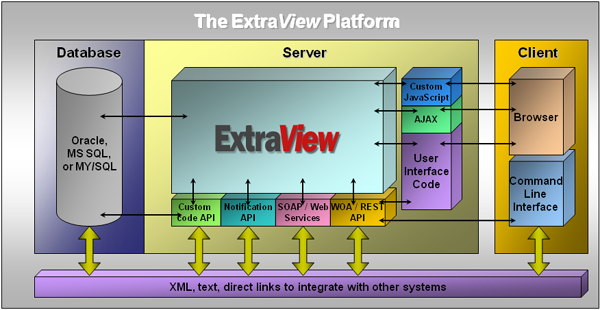
Single or Multiple ExtraView Instances
ExtraView is architected to allow you to create within a single database an unlimited number of systems (i.e. “Areas”) and subsystems (i.e. “Projects”). Each Area and Project can have its own workflows, layouts, sub-layouts, business rules, notification rules, administrators, security, privacy, etc. Hence, different parts of your organization, such as Engineering, Marketing, and Human Resources can each create and maintain within one database their own Areas and Projects. For example, you might create an Area called “Human Resources” that contains four Projects (e.g. “Training”, “Recruiting”, “New Employees”, “Staff Evaluations”, etc.). You could also create a second Area called “Engineering” that contains three Projects (e.g. “Defects”, “Requirements”, “Test Cases”). Using a variety of ExtraView’s configurable security settings, each Area and Project can be granularly locked down as required, even to the point where users cannot tell that they are sharing the same database with users from other Areas and Projects.
Given that, a common question I’m asked by ExtraView administrators who are looking to roll out their second ExtraView system is whether they should put that new system in a new ExtraView instance or create it within the existing instance. An ExtraView instance that contains multiple systems is sometimes referred to as a multi-tenant instance. There are pros and cons to multi-tenant instances. The pros are: consolidated reporting, shared licenses, and one database to maintain. The cons include: additional coordination, additional complexity, and little or no improvement in hardware utilization. (more…)
 ExtraView Blog