Over the years, I’ve worked with a wide variety of customers, from software development groups, to energy companies, to banks. When we get brought in on a project, many times it is because a decision has been made that the existing business processes and procedures are not working, and it’s time for a change.
Change is not universally embraced, however.
One of the frequent requests that we hear during initial implementation projects, is that management needs a certain set of reports – and this is where they pull out The Spreadsheet.
Many companies have one (or more!) of these – the Excel spreadsheet that has been maintained and updated for years, becoming more and more complex with multiple sheets incorporating data sheets, chart sheets, pivot tables, complex formulas and formatting that makes it look *just* right.
It is often with some trepidation that our customers bring up the existence of The Spreadsheet, and ask whether ExtraView can generate a report that brings back the same data – and make sure that the results look *exactly* the way the existing Excel spreadsheet does.
Most of the time, the standard ExtraView reporting engine can come up with the same results – but many times these reports are more complex, taking advantage of the many features of spreadsheets – data fed into calculations, the results of which are fed into charts, pivot tables and more. Often, it would take several different reports to generate the same set of charts and tables that are collected together within the single spreadsheet.
The reporting requirements are not limited to retrieving the correct data – the look and feel of the existing Excel spreadsheet -from the presentation of the data in a particular type of chart or pivot table – to the report titles, headings and color combinations – these considerations are often as important to the end users as the data itself.
“Can we make it look exactly like this report?” has, up until now, often required a custom report within ExtraView – which allowed us to output the results with the exact headers, titles, formatting and colors to make it familiar to the users.
With ExtraView 7, users can now leverage all of their expertise and existing work – combining the power of the reporting engine within ExtraView, with the specialization of Excel spreadsheets for calculations and formatting.
When creating a new column report, users can now choose “Microsoft Excel (Merge with uploaded file)” as their output type. They are then prompted to upload an existing Excel report template, and to identify the sheet and range of cells that should be populated with the raw data from ExtraView. All of the other sheets and calculations can then reference that data sheet and cell range to use as the data source for charts and tables in the report.

Report filters are then selected, just like any other ExtraView report, and the report is saved. Now when the user runs the report, the merged Excel spreadsheet will be presented as the final output.
The ExtraView report data will be placed in the sheet in the cell range specified:

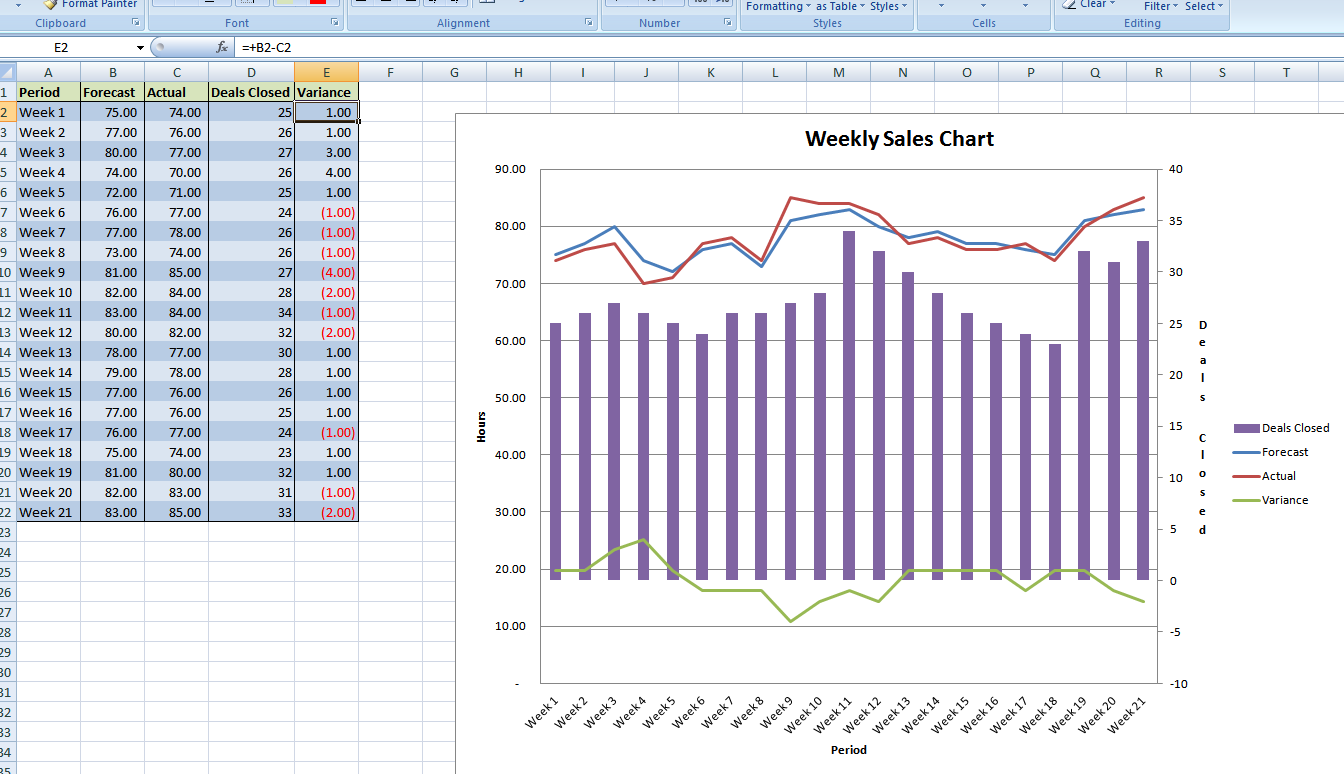
The other page(s) of the spreadsheet then pull the data into tables and charts, and perform caculations and other functions on the data:
Excel spreadsheets aren’t going anywhere – and there are a lot of power users out there. Rather than reinvent the wheel, and try to build into ExtraView all of the functionality that a spreadsheet can offer – we’re leveraging the existing Excel application – and letting our customers leverage the expertise they already have with Excel – and the investment that has been made in The Spreadsheet.
Does your group have reports like this? Have you implemented changes to your processes – and how have you juggled the conflicting desires of “we need to change” vs “but it has to look and work exactly the same as before!”
 ExtraView Blog